
For a long time Smart Tray did not receive new features. Now the wait is finally over. The latest update introduces a function that many users requested: a Plant3D cable tray BOM generator.
The Cable Tray BOM command allows you to generate a bill of materials for cable trays directly from your Plant 3D model. First, the command collects the tray data automatically. Then, it exports the result to an Excel file. As a result, you can create tray material lists much more easily without building complex reports or calculating tray lengths manually.
Generate Cable Tray BOM from the Model
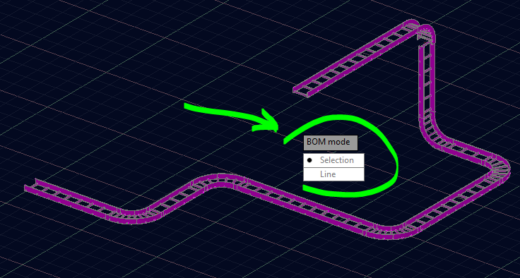
The Cable Tray BOM command offers two simple ways to create the report.
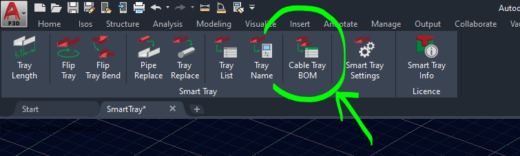
First, you can select trays directly in the drawing. In this case Smart Tray analyzes only the trays you select.
Alternatively, you can generate the bill of materials by tray line numbers. Smart Tray automatically collects every tray that belongs to the selected tray lines. As a result, you can generate a complete tray report for an entire route in just a few seconds.
What the Plant3D Cable Tray BOM Contains
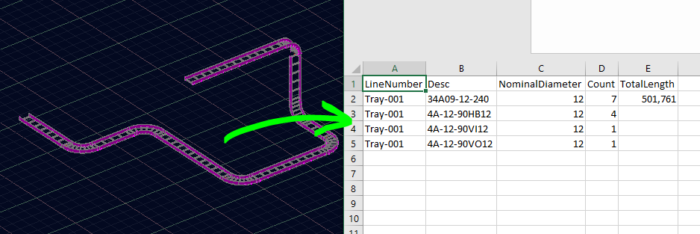
The exported Excel file contains the most important cable tray information in a clean table format.
The Cable tray BOM report includes:
-
Line Number
-
Description
-
Nominal Diameter
-
Quantity
-
Total Length of straight trays
Smart Tray automatically groups straight trays together and calculates their total length. At the same time, the command counts all tray fittings and includes them in the report. This provides a quick overview of the installed trays and the required materials.
Faster Cable Tray Lists for Plant 3D Projects
The Cable tray BOM feature makes it much easier to generate tray material lists for documentation, reporting, or procurement.
Instead of manually counting trays or preparing complex reports, you can create the list directly from the model in just a few seconds.
After the export finishes, Smart Tray will also ask if you want to open the Excel file immediately, so you can review the result right away.
Create a Cable Tray BOM in Plant 3D
Many Plant 3D users look for ways to create a cable tray BOM directly from the model. Standard reporting tools in Plant 3D can generate tray lists, but they often require additional setup and customization.
The Cable tray BOM function in Smart Tray simplifies this process by collecting tray data automatically and exporting the result to Excel. This allows engineers to quickly generate tray lists, reports, and material take-offs during the design process.
Learn More
If you want to learn more about the other Smart Tray tools, please check the earlier post that explains the existing functions and workflow in more detail.