
Introduction
Smart Support is designed to improve Plant 3D pipe support tools by automating common tasks and reducing manual work.
With the latest update, the core behavior has changed: instead of writing changes immediately, the main commands now include a preview step, allowing you to review modifications before applying them.
This update also introduces Excel export, improved tag numbering, and several stability improvements.
Preview for Plant 3D Smart Support
One of the biggest improvements is the introduction of a preview table for all major functions.
Instead of writing changes instantly, Smart Support now:
- Collects all modifications first
- Displays them in a structured preview table
- Allows you to apply changes only after review
Each preview shows:
- Old values
- New values
- Color-coded differences
This makes it easier to validate changes before committing them to the model.
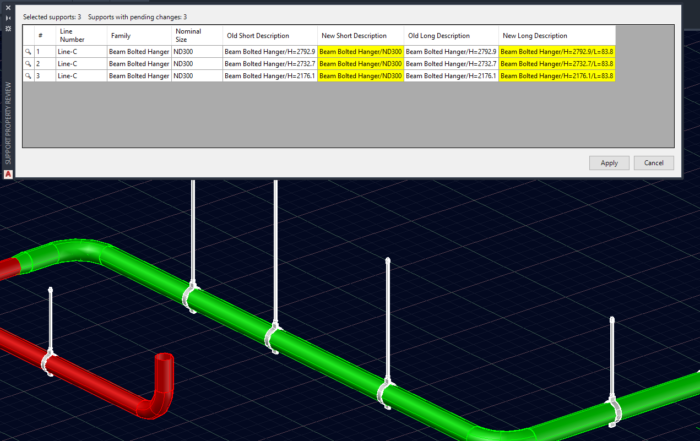
Highlight Supports Directly from the Preview
The preview table is interactive.
From the list, you can:
- Select any support
- Highlight it directly in the 3D model with double clicking on the magnifier icon
This helps verify modifications in context, which is especially useful when working with complex Plant 3D support layouts.
Improved Tag Numbering in Plant 3D Support Tools
Tag numbering has been improved to give more control.
When using running numbers:
- The command now asks for a starting number
This makes numbering more predictable and easier to manage across larger projects.
Safer Reference Generation
The SupportRef function also follows the new workflow.
It:
- Calculates the Reference field based on a rule file
- Shows the result before applying it
This allows you to review generated reference values before they are written into the model.
Support List Export for Plant 3D Support Tools
SupportList function also behaves the same way from now on.
Previously, the command exported directly to CSV.
Now it first displays a preview list.
From this preview, therefore you can:
- Review the dataset
- Export to CSV
- Export directly to Excel
Excel Export for Plant 3D pipe supports
Excel export is now available as a built-in option.
The command generates a .xlsx file, which:
- Is easier to read
- Can be used directly for reporting
- Eliminates the need for CSV conversion
This improves pipe-support data handling in Plant 3D workflows.
Stability Improvements
Several internal improvements were made:
- A single faulty support no longer stops the entire command
- More robust handling of missing or invalid parameters
- More stable processing for larger selections
Updated Help Menu
The app also includes a new help menu to support the improved workflow.
It now:
- Explains the preview-based behavior
- Provides more details on existing functions
Conclusion
This update significantly improves how Plant 3D Smart Support behave in daily workflows.
By introducing preview steps:
- Changes can be reviewed before applying
- Errors are easier to avoid
- Users have more control over their data
Hence, combined with Excel export and stability improvements, Smart Support becomes a more reliable solution for managing pipe supports in Plant 3D. Also, if you want to create better looking and more flexible pipe supports in Plant3D, check my other application: Python Pipe Support.